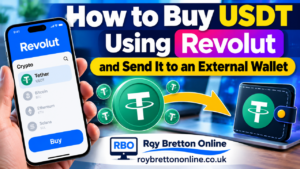
In this tutorial, I want to show you how to buy USDT (Tether) using Revolut and then send it to an external cryptocurrency wallet. I’ve recently recorded the entire process on my mobile phone while displaying it on my computer, so you can follow along with the video as well as these written instructions.
I use Revolut because it’s familiar to me, but the general principles apply to many cryptocurrency services. The most important things are choosing the right currency, matching the network at both ends, checking the wallet address and allowing for any transfer fees.

Watch My Step-by-Step YouTube Tutorial
Video: How To Buy USDT Using Revolut And Send It To An External Wallet
What Is USDT?
USDT, also called Tether, is a cryptocurrency known as a stablecoin. It is designed to track the value of the US dollar, although its value and availability are not guaranteed. USDT is different from ordinary US dollars held in a bank account. If you’re purchasing USDT in Revolut, make sure you’ve selected Tether in the Crypto section, not the standard USD currency account.
What You Need Before You Start
- A Revolut account with cryptocurrency access enabled.
- Enough GBP to buy the USDT you need, plus an allowance for any transfer fees.
- A destination service that accepts USDT, with a valid deposit address and supported network.
- Time to complete the payment before any invoice or address expires.
Buying USDT With Revolut
Open the Revolut app on your phone and go to Crypto. Search for Tether (USDT), select it and tap Buy. You can normally enter the amount you want to spend in pounds or the quantity of USDT you want to receive. I find it useful to switch between the two when I need a particular amount for a payment.
Before confirming, use the Review Order screen to check the price, the amount of USDT you’ll receive and any fees. In the transaction shown in my video, Revolut displayed no purchase fee, but that does not mean every purchase or external transfer will be free.
Buying USDT Through Revolut
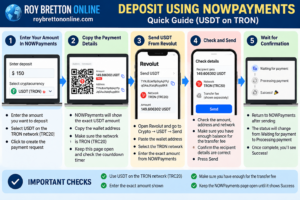
This infographic shows the main steps involved in buying USDT using the Revolut app. You can follow the instructions above or watch my YouTube tutorial for a demonstration of the process.
Getting An External Wallet Payment Address
For my demonstration, the receiving service created a payment request through NOWPayments. I selected USDT using the TRON (TRC20) network. This was the network supported for that particular transaction, not a network that should automatically be selected for every USDT transfer.
The payment page then displayed an exact USDT amount, a destination wallet address and a countdown timer. I copied the address and returned to Revolut. If you’re working between a computer and phone, take care when moving the address between devices and compare the beginning and end of the pasted address with the original. Avoid typing a long wallet address manually if you can.
Quick Reference: Buy USDT And Send It From Revolut
Follow These Steps
- Open Revolut → Crypto → Tether (USDT) → Buy.
- Choose the GBP amount or USDT quantity, review the quote and confirm the purchase.
- Open the receiving service and generate a new USDT deposit request.
- Select a network supported by both the receiving service and Revolut. In my example, this was TRON (TRC20).
- Copy the current deposit wallet address and note the exact USDT amount requested.
- In Revolut, open USDT → Send and paste the destination address.
- Enter the requested amount, check the recipient information and review any network or service fees.
- Before sending, confirm that the address, network and amount the recipient receives all match the active payment request.
- Confirm the transfer only when everything is correct, then wait for the receiving service to show the payment as completed.
Important: If Revolut reduces the amount because your balance cannot cover the fees, do not send a smaller amount without checking the recipient’s requirements. If the payment request expires, obtain fresh instructions.
Sending The USDT To The External Wallet
In Revolut, open your USDT holding and choose Send. Paste the payment address from the receiving service and check that the network shown by Revolut matches the network on the payment request. Different networks may support similarly formatted addresses, so the address alone is not enough to establish that a transfer is safe.
Enter the exact amount requested by the receiving service. Revolut may ask whether the address belongs to you or someone else and may request recipient details. Enter accurate details for the actual recipient, using information you have verified with the provider. A label such as “NOWPayments” is simply a reference for your own records and does not verify the legal recipient.
On the final review screen, check the amount the recipient will get, not just the amount leaving your balance. I ran into this issue during my recording: Revolut adjusted my amount because there was not enough left to cover the transfer fee. I had to buy a little more USDT before completing the payment. It’s a useful reminder to leave room for fees from the outset.
How Long Does A USDT Transfer Take?
After you confirm the transaction, Revolut may show the transfer as pending or sent while the payment processor waits for blockchain confirmations. The receiving page may move through statuses such as waiting, processing and paid successfully. In my example, the payment was eventually confirmed and credited, but processing times can vary.
Don’t send a second payment simply because the receiving page hasn’t updated immediately. Check the transaction status first and contact the relevant provider if the payment remains unresolved.
Why I Was Making This Transfer
I’ve been testing a small online project involving clicking adverts, and I wanted to demonstrate the practical side of purchasing and transferring USDT. I’m sharing what I’ve actually done rather than presenting cryptocurrency transfers as a way to earn money in themselves.
If you’re interested in the wider experiment, you can read my first five days testing a $14 online opportunity. It’s important to distinguish earnings displayed inside a platform from funds you’ve successfully withdrawn. Platforms that require deposits to access advertised earnings can be high risk, so research them carefully and never assume future payouts are guaranteed.
More Revolut And Cryptocurrency Guides
If you want to learn more about moving cryptocurrency in either direction, I’ve written several related guides:
- How To Turn Crypto Into Pounds Using The Revolut App, for converting a crypto balance back into GBP.
- How To Send Currency From Revolut To An External Platform, another practical example using a different network and destination.
- My Crypto Experience: Starting Small And Staying Careful, about my approach to testing crypto-related projects.
Join My Free Online Marketing Community
I’ve also started a free Skool community where I share internet marketing tutorials, tools I’m testing and lessons from my experience working online. You’re welcome to take a look at my free Roy Bretton Online Skool community.
Final Thoughts
Buying USDT in Revolut and sending it to an external wallet becomes more familiar once you’ve completed the process. Even so, I always recommend taking the time to verify the currency, wallet address, network, payment amount and fees. Crypto transfers are usually irreversible, and neither a successful transfer nor a displayed account balance guarantees that a receiving platform is safe.
If you have a question about anything I’ve covered, feel free to leave a comment below or on the YouTube video. I’ll do my best to help.