Updated October 2026: I originally wrote this article in October 2025 when I decided not to upgrade my main computer from Windows 10 to Windows 11. A year later, I am still using Windows 10 on my main Dell Precision workstation, so I thought it was a good time to revisit the subject and explain whether I still believe I made the right decision.
My main computer is capable of running Windows 11, so this isn’t simply a case of trying to keep an unsuitable old computer alive. I have deliberately stayed with Windows 10 because my existing setup works well, my software works and I haven’t yet seen a compelling reason to change a system that I use productively every day.
However, things have changed since I originally wrote this article. Standard support for Windows 10 ended on 14 October 2025, so anyone choosing to remain with Windows 10 now needs to consider security and Microsoft’s Extended Security Updates programme.
Why Am I Still Not Upgrading To Windows 11?
The simple answer is that my Windows 10 setup continues to do what I need it to do. I run an online business, create and edit videos, record audio, work on websites and use my computer extensively every day. Reliability and productivity matter considerably more to me than simply having the newest operating system.
I am certainly not saying that everyone should avoid Windows 11. For many people it will be the right choice, particularly when buying a new computer. I’m simply explaining why I have chosen not to upgrade yet and what my experience has been after another year of using Windows 10.
My Current Computer Setup
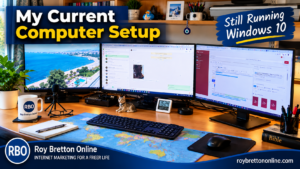
My main desktop is a Dell Precision workstation. It is Windows 11 compatible, but I currently run Windows 10 on it. I use three 27-inch monitors, and the computer is an important part of my day-to-day online work.
I also have an older Dell Latitude laptop which is more than ten years old. Despite its age, it still performs remarkably well for the tasks I use it for. It has 16 GB of RAM and a 2 TB SSD, so it certainly doesn’t feel like a computer that needs throwing away simply because of its age.
This is one of the reasons I’m reluctant to replace perfectly serviceable equipment simply because something newer has arrived. If a computer is reliable, fast enough for the work you do and can still be kept secure, I believe there is a strong argument for continuing to use it.
I wrote more about this subject in Don’t Throw Your Windows 10 PC Away!, where I explain why an older Windows 10 computer may still have plenty of useful life left in it.
1. My Existing Software And Workflow Work
One of my biggest concerns about changing operating systems is software compatibility. My computer isn’t just used for browsing the Internet and sending emails. It is a working machine that I depend on every day.
I use Camtasia for video editing, screen recording software, microphones, audio equipment, browser-based applications and various other tools. When everything is working properly, I don’t particularly want to introduce unnecessary problems merely for the sake of upgrading an operating system.
That’s not to say that Windows 11 wouldn’t work with my software. Much of it undoubtedly would. My point is simply that Windows 10 is currently doing the job very well.
2. Windows 10 Has Been Extremely Stable For Me
Windows 10 is a mature operating system, and my experience with it has generally been extremely good. My main computer is stable and predictable, which is exactly what I want when I’m trying to get work done.
For me, reliability is more valuable than having the latest interface or newest features. I don’t want to spend valuable working time troubleshooting something that wasn’t broken in the first place.
3. I Don’t Want To Create Compatibility Problems
Anyone who has used computers for a long time knows that an operating system upgrade can sometimes create unexpected issues. A particular driver may behave differently, an older program may stop working properly or a peripheral may suddenly need attention.
That doesn’t mean Windows 11 is unreliable. It simply means that changing a working computer introduces another variable. With the amount of video, audio and website work I carry out, stability is important to me.
4. I Like The Familiar Windows 10 Interface
I’ve used Windows 10 for years, so navigating around it is second nature. I know where everything is and can normally carry out what I need without thinking about it.
Of course, I could learn Windows 11. That isn’t the issue. The question I ask myself is whether changing operating systems would currently make me more productive. At the moment, I don’t believe it would.
5. Older Computers Can Still Be Very Useful
My older Dell Latitude laptop is a good example. Despite being more than ten years old, it still works remarkably well. Upgrading it with an SSD and additional memory has helped to keep it useful.
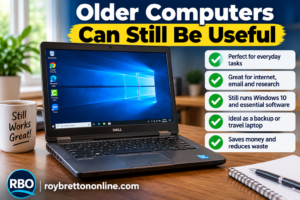
I think we sometimes write computers off too quickly. Not everybody needs the latest processor or graphics card to browse the web, write documents, answer emails or carry out everyday online tasks.
If you’re wondering whether you really need to replace an older machine, take a look at Don’t Throw Your Windows 10 PC Away!. In that article I explain more about my experience of keeping older Windows hardware useful.
6. Windows 10 Extended Security Updates Give Me More Time
This is an important point because the situation has changed since I originally wrote this article.
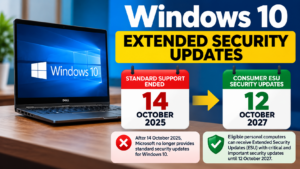
Microsoft ended standard support for Windows 10 on 14 October 2025. However, eligible personal computers running Windows 10 version 22H2 can be enrolled in Microsoft’s Consumer Extended Security Updates programme.
For eligible consumer devices enrolled in ESU, Microsoft provides critical and important security updates through 12 October 2027. ESU doesn’t turn Windows 10 back into a fully supported operating system with new features and general improvements, but it provides additional security protection while users make the transition to Windows 11.
For me, that removes some of the pressure to make an immediate decision. It gives me additional time to continue using a computer that works well while deciding when moving to Windows 11 genuinely makes sense.
If you’re trying to enrol for Extended Security Updates and you’re having problems getting it to work, I have also written about my own experience in Struggling To Get Windows 10 Extended Security Updates?
7. I Don’t Want To Reconfigure A Working Computer Without A Good Reason
Moving to a new operating system can involve more than pressing an upgrade button. There may be settings to change, applications to check, drivers to update and other adjustments to make.
I would rather spend that time creating videos, building websites and working on my online business unless there is a genuine benefit from upgrading.
There will undoubtedly come a point when moving to Windows 11 is the sensible thing for me to do. I simply don’t believe I need to rush into it.
One Year Later, Do I Regret Staying With Windows 10?
No, I don’t. A year after originally writing this article, Windows 10 is still doing what I need it to do on my main computer.
That doesn’t mean my view will never change. In fact, I have recently been looking more closely at my Dell Precision workstation, its graphics card and the requirements of software such as Camtasia. At some point I expect I will move to Windows 11, particularly as software requirements continue to change.
But I prefer to upgrade because there is a genuine benefit or need rather than simply because a newer version of Windows exists.
Should You Stay With Windows 10?
I wouldn’t recommend blindly copying what I’m doing. Your circumstances may be completely different from mine.
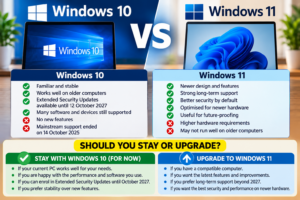
If you’re running Windows 10, the first consideration should now be security. Standard Windows 10 support has ended, so don’t assume that carrying on exactly as before is the same as when Microsoft was providing normal security updates.
If your computer is eligible for Microsoft’s Extended Security Updates programme, that provides a temporary route for receiving important security updates while you decide what to do next.
You may decide that Windows 11 is the better option now, especially if your computer supports it and all the software and peripherals you depend on are compatible.
Who Might Benefit From Staying With Windows 10 For Now?
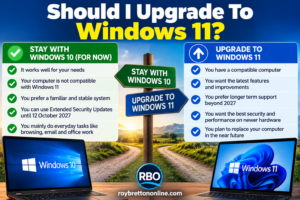
- People enrolled in Extended Security Updates who aren’t ready to move to Windows 11.
- Users who rely on particular software or hardware and want to check compatibility carefully before upgrading.
- People with older but perfectly usable computers that don’t meet the Windows 11 hardware requirements.
- Anyone planning to replace a computer in the near future who doesn’t want to make unnecessary changes to their existing setup first.
Who Should Consider Windows 11?
- Anyone buying a new computer designed for Windows 11.
- People whose existing computer meets the Windows 11 requirements and whose software and peripherals are compatible.
- Users who want Microsoft’s latest Windows features and developments.
- Anyone who doesn’t want to rely on the temporary Windows 10 ESU programme.
What Happens If I Don’t Upgrade To Windows 11?
Your Windows 10 computer doesn’t suddenly stop working because you haven’t upgraded to Windows 11. However, standard support for Windows 10 has ended, which makes the security side of the decision increasingly important.
That is why I wouldn’t recommend simply ignoring the situation. If you’re remaining on Windows 10, investigate whether your computer is eligible for Extended Security Updates and understand that ESU is a temporary measure rather than a permanent alternative to moving away from Windows 10.
My Plan From Here
For now, I’m continuing to use Windows 10 on my main computer while keeping a close eye on my software and hardware requirements.
I’m not anti-Windows 11, and this isn’t an article telling everyone else to avoid it. It’s simply my experience as someone who uses a computer extensively for running websites, creating videos and carrying out online work.
When Windows 11 offers me a clear practical benefit, or when the software I use makes the move necessary, I’ll upgrade. Until then, I’m happy to continue with a system that remains productive and reliable for me.
Related Windows Articles
If you’re trying to decide what to do with an existing Windows 10 computer, these two articles may also be useful:
- Don’t Throw Your Windows 10 PC Away! – my thoughts on keeping an older Windows 10 computer running rather than unnecessarily replacing a machine that still does the job.
- Struggling To Get Windows 10 Extended Security Updates? – my experience of getting Microsoft’s Extended Security Updates working on Windows 10.
Have Your Say
Are you still using Windows 10 in 2026, or have you already moved to Windows 11?
If you’ve upgraded, I’d be interested to hear whether the change went smoothly and whether you noticed any real benefits. Equally, if you’ve deliberately remained on Windows 10, what made you decide to stay?
Please feel free to leave a comment below. Other people’s real-world experiences can be particularly useful for anyone trying to make the same decision.
Final Thoughts
A year after originally deciding not to upgrade to Windows 11, I’m still comfortable with that decision. Windows 10 continues to work well for me, and Extended Security Updates provide some additional breathing space while I consider what comes next.
But that breathing space won’t last forever. Windows 10 ESU is a transition period, not a permanent solution. My intention is therefore not to avoid Windows 11 indefinitely, but to move when doing so makes practical sense for my own computer setup and workflow.
For the moment, my approach remains simple: if it works reliably, remains appropriately protected and allows me to do my work efficiently, I see no reason to change it purely for the sake of change.