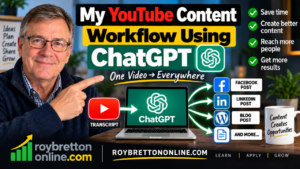
The title of my blog post and video is “My YouTube Content Workflow Using ChatGPT.” Creating a YouTube video takes time. You have to think about the subject, record the video, edit it, create a thumbnail and finally upload everything to YouTube. However, once the video has been published, there is still plenty more that can be done with the content you have created.
In this post, I want to show you my YouTube content workflow using ChatGPT. It is a straightforward process that helps me create YouTube descriptions, social media posts and blog content without continually starting from scratch. More importantly, I am repurposing my own original content rather than asking artificial intelligence to create something about a subject I know nothing about.
Try Wealthy Affiliate For Free.
Why I Created This YouTube Content Workflow Video
The idea for this video came after a conversation with a friend who also creates YouTube videos. I looked at one of his recent uploads and noticed that there was virtually nothing in the description. I see this quite frequently on YouTube, and it always seems like a missed opportunity.
If you already have a large and established channel, you may be able to publish a video with a minimal description and still receive plenty of views. However, smaller channels need to give themselves every reasonable opportunity to be discovered. I have covered this subject in more detail in my guide on how to publish YouTube videos that actually rank, where I look at several practical ways to give a video a better chance of being found and watched.
Of course, YouTube has become much better at understanding video content. Automatic transcripts, captions and artificial intelligence give the platform far more information than it had years ago. Nevertheless, titles and descriptions still provide useful context, so I see no reason to leave the description box empty.
Starting With The YouTube Transcript
One of the most useful features on YouTube is the ability to access a transcript of a video. Once a video has been processed, YouTube will often generate a transcript automatically. That transcript gives me an excellent starting point for the rest of my content workflow.
In the video, I demonstrate this process using one of my friend’s YouTube videos. I open the transcript and select the option to copy it without timestamps. I can then take the complete transcript across to ChatGPT and ask it to create a YouTube description based on what was actually said in the video.
This is an important point. I am not asking ChatGPT to guess what the video is about or manufacture a description from a title. Instead, I am giving it the words that were actually spoken. As a result, it has much more context to work with when producing the description.
Using ChatGPT To Create A YouTube Description
Once I have copied the transcript, my prompt to ChatGPT can be surprisingly simple. I explain that the text comes from a YouTube video and ask for a detailed description, along with suitable tags and hashtags. ChatGPT can then analyse the transcript and produce a first draft within seconds.
I don’t normally copy everything without looking at it first. I read through the description and make changes where necessary because I want the finished result to sound like me. Sometimes I will add something, remove unnecessary wording or change a sentence that doesn’t sound natural.
There is an important principle here when using AI for content creation. ChatGPT is an assistant, not a replacement for your own knowledge and judgement. It can save a considerable amount of time, but the person publishing the content should still take responsibility for what appears on the page.
Try Wealthy Affiliate For Free.
Adding The Description In YouTube Studio
In my video, I also demonstrate where the generated information goes inside YouTube Studio. When uploading a video, there is space for the title, description and thumbnail, together with additional settings further down the page. The description field allows plenty of room to explain the subject properly.
I then add the relevant tags and hashtags generated from the transcript. Tags are not something I would obsess over, and I certainly wouldn’t add unrelated phrases simply to fill the available space. Relevance is far more important than trying to include every keyword you can think of.
The same principle applies to the description. It should be written primarily for a human being who wants to know what the video contains. Relevant search phrases can occur naturally within the text, but forcing keywords into every paragraph usually makes the content unpleasant to read.
One YouTube Video Can Become Much More
This is where my YouTube content workflow using ChatGPT becomes particularly useful. Once ChatGPT has the transcript and understands the subject, I don’t have to end the conversation after creating the YouTube description. I can continue working from the same original content.
For example, I can ask ChatGPT to create a Facebook post promoting the video. Once that is finished, I can ask for a LinkedIn version written for a business audience. I use a similar approach in my guide on how to turn your website content into social media posts. Although the posts originate from the same content, they do not necessarily need to use identical wording.
I can then take the process another stage further and create a full blog post. In fact, the article you are reading now has been produced from the same general workflow demonstrated in my YouTube video. The original video therefore becomes the foundation for several different pieces of online content.
Turning A YouTube Transcript Into A Blog Post
A transcript on its own does not normally make a good blog post. Spoken English and written English are different, and a raw transcript usually contains repetitions, unfinished sentences and words that make perfect sense in conversation but look awkward on a page.
This is where ChatGPT can be particularly helpful. I can give it my transcript and ask it to turn the information into a properly structured article with headings, paragraphs and a logical flow. I can also ask for the finished article in HTML, which makes it easier to transfer the content into WordPress.
However, I still don’t regard the first AI-generated version as automatically finished. I want sensible paragraphs rather than a succession of one-sentence paragraphs, and I want the article to read like a traditional blog post. I also check the facts, alter the wording where appropriate and add my own thoughts before publishing.
Try Wealthy Affiliate For Free.
Repurposing Content Rather Than Continually Starting Again
For me, this is one of the biggest benefits of using ChatGPT in an online business. Creating original content requires effort, so it makes sense to get as much value as possible from that work. A video does not have to exist only on YouTube and then disappear into the archives.
The same original content can potentially become a YouTube description, Facebook post, LinkedIn post and website article. Parts of it may also provide ideas for YouTube Shorts, Facebook Reels or future videos. Therefore, one piece of work can become the starting point for a much wider content strategy.
This doesn’t mean posting exactly the same material everywhere. Different platforms have different audiences, so I prefer to adapt the presentation while retaining the original message. The important thing is that I already have the raw material because I created the original video.
Don’t Use ChatGPT To Pretend You Are An Expert
There is another side to artificial intelligence that I believe content creators need to consider. ChatGPT can produce convincing information about almost any subject, but that doesn’t mean we should suddenly start presenting ourselves as experts in areas we don’t understand. I use AI regularly myself, but I have also written about the potential problems with relying too heavily on AI, particularly when information sounds convincing but may not be correct.
I regularly see people talking about subjects where it appears they have very little personal knowledge or experience. AI makes that much easier because anyone can generate an article or script within seconds. However, being able to generate words is not the same as understanding the subject.
My preference is to use ChatGPT to support content based on things I already know, have experienced or have researched properly. If I use it for research, I still want to check important facts before publishing them. AI can make us considerably more productive, but we still need to use our own judgement.
Can ChatGPT Save Content Creators Time?
For me, the answer is definitely yes. Writing a YouTube description, followed by separate Facebook and LinkedIn posts, can take a considerable amount of time. Turning the same video into a properly structured blog article adds even more work.
ChatGPT dramatically reduces the time required for those tasks. Instead of looking at a blank page every time, I already have a draft based on my original material. I can then concentrate on checking, editing and improving the content rather than continually recreating it. I also use ChatGPT Projects to organise my day-to-day content workflow, which helps me keep different websites and types of content separated.
That is how I prefer to think about AI in my online business. I don’t want it to replace my voice, experience or ideas. I want it to remove some of the repetitive work that would otherwise prevent me from creating and publishing more useful content.
Try Wealthy Affiliate For Free.
Watch My YouTube Content Workflow Using ChatGPT
In the accompanying video, I take you through the process on my computer so that you can see exactly what I do. I demonstrate how I copy a YouTube transcript, take it into ChatGPT, generate a description and then add the relevant information inside YouTube Studio.
I also demonstrate how the same conversation can continue into Facebook, LinkedIn and a blog post. If you create YouTube videos yourself, I hope it gives you some ideas about how you can get considerably more value from content you have already produced.
If you are trying to improve your YouTube channel generally, you may also find my article on what I learned about YouTube’s algorithm useful. YouTube continues to change, so I believe it is important to keep learning and adapting rather than relying entirely on methods that worked several years ago.
Final Thoughts
Artificial intelligence is changing the way we create and distribute online content, but I don’t believe that means we should hand everything over to AI. The best results, in my experience, come from combining genuine knowledge and experience with tools that help us work more efficiently.
If you already create YouTube videos, your existing content may contain far more value than you realise. Instead of creating a video and immediately moving on to the next subject, consider what else can be produced from the transcript. A Facebook post, LinkedIn post or useful website article may already be sitting inside the video you have just created.
If you have any questions about this workflow, YouTube, SEO, content creation or using ChatGPT in your online business, please leave a comment below or get in touch. You can also explore more of my articles and videos here at Roy Bretton Online.