In the video below, I would like to show you, how to add a new word to Dragon NaturallySpeaking. In case you are not aware, Dragon NaturallySpeaking is software that I can firmly recommend. I literally use Dragon NaturallySpeaking just for typing as I’m not particularly quick at typing. Dragon NaturallySpeaking can do much more than just type, however, there are a lot of commands to remember! I personally just use it for typing, it says me hours of time!
Take A Look At The Video And Screenshots Below
Let’s Add Some Words And Phrases
If you go to the toolbar on Dragon NaturallySpeaking you will see the menu at the top. There are different styles to the Dragon toolbar, but basically, they all work the same.
If you click on vocabulary and then go to “open vocabulary editor” this will enable you to search for any word within the vocabulary editor. If the word is not in the Vocabulary Editor, you can add the particular word.
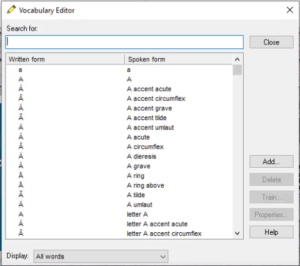
Sometimes words can be very similar, we all have different words that we use a lot. One word that I use a lot is the word “Stihl” obviously, this sounds very much like “steel” or “still”. So, to overcome this issue we can create a phrase, like “Stihl blower” or “Stihl chainsaw”. In this way, Dragon can see that the particular word relates to a subject.
A Phrase Will Help Dragon
Another word that I use a lot is the word “Tree stump grinding” Dragon has a tendency to miss out the last word, which is “grinding”. We can overcome this issue by adding the phrase “Tree stump grinding” to the Vocabulary Editor. It doesn’t take long to add a word to the Vocabulary Editor, I also know for a fact that it saves time in the long run.
We Need To Train New Words And Phrases
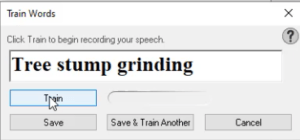
It’s important to train new words and phrases, in this way it helps Dragon recognise new words. You can see that within the Vocabulary Editor we can train new words and phrases. Click on “Train” and then you will see the “Train Words” tab open. We then need to click on the word “Train” and then speak the word or phrase out. It is recommended that the process be repeated three times. We can then save the word or phrase or go on to save and train another word.
Check Your Word Is In The Vocabulary Editor
We can then go back to the vocabulary editor and make sure that our word is saved. It may seem like a lot of work, but once you repeat the process it really is quite quick. In the long run, the process will save a lot of frustration and make sure that your accuracy remains efficient.
You Can Find Out More About Why I Use Dragon NaturallySpeaking Here